
Explore XC60 features
Simple controls. Multiple drive modes. Advanced safety. It’s tech designed to keep pace with real life.

XC60 Displays and connectivity
Your podcasts, playlists and plans – on call.


11.2-inch centre display
The large, tablet-like 11.2-inch centre display with its intuitive user interface gives an instant overview and control of most car functions. The most important functions are easily accessible on the home screen, with navigation in your field of vision so that you can keep attention on traffic. Below you'll find selected in-car apps such as media and phone, as well as buttons for the power tailgate and glove box. There's also a contextual bar with commonly used functions that only appear when they're available, helping to reduce complexity for you as a driver. At the bottom there's a fixed menu with a home button, in-car apps, climate, park assist camera and car settings. A special view with quick controls for frequently used functions makes it even easier to adapt the car's functions to your own preferences.
12.3-inch driver display
The 12.3-inch driver information display shows all the essential driver information that’s needed to keep you constantly updated. It's designed to give you intuitive control and quick overview. The driver information display features two display modes showing different levels of information: Calm and Navi.
Head-up display
The head-up display presents vital driver information so it appears in your field of vision at a distance that's comfortable for your eyes. You can keep your eyes on the traffic at the same time as you see actual speed, speed limits, navigation directions and more. You don't have to change focus or look down, which gives less strain on the eyes. The brightness of the head-up display adapts automatically to the light conditions, and you can set the system to suit your own personal preferences and link it to the memory function for the power-operated seat. Please note: Digital Services is required for full functionality including navigation directions.


Two drive modes
On regular streets and motorways, the 8-speed automatic transmission delivers smooth, controlled acceleration for a relaxed drive. Switch to the Off-Road drive mode when roads get bumpy to enhance traction and stability, especially over uneven surfaces. Use the centre display to toggle easily between the two drive modes without returning to settings.
Google built-in
Personalise your drive with Google built-in, a range of helpful apps available with unlimited data as part of your free digital services package. Google Maps Find the best route to your destination with Google Maps. Simple in-car navigation can even reroute you based on the latest traffic updates. Google Play Download the apps you love to bring your favourite music, podcasts and audiobooks on every journey. Google Assistant Say “Hey Google” to adjust climate settings, call and text, play audio and more using just your voice. Digital services Use Google Maps, Google Assistant and any app downloaded on Google Play Store with unlimited data for four years. This digital services subscription is included with the purchase of a new Volvo car. A fee applies after four years. Google, Google Play and Google Maps are trademarks of Google LLC.


Easy software updates
Get software updates sent directly to your car via the cloud. These over-the-air (OTA) updates roll out periodically, improving your car over time with no shop visits required. OTA updates also make it easy to upgrade and add software-based features and packages at any time. Cadence of over-the-air updates will vary per model and market.
Volvo Cars app
Get more from your car with the free Volvo Cars app. Use it to remotely access your car, activate climate functions, update car software and more. Easy access Unlock your car in the app or use it set up a digital key. Can’t remember where you parked? Locate your car on a map, honk the horn or flash its lights. Climate settings Warm or cool the cabin before you get in. Heat seats and the steering wheel, too. You can also run a purification cycle to refresh cabin air before your journey. Charging controls See charge level and range at a glance. Find nearby charging stations. Schedule charging times and confirm charging status. Convenient updates Get notifications when updates are available for your car's software-based features. Tap to start the update or schedule it for a more convenient time. Features may not be available in all markets or for all models and may not be available until a later date. Remote functions may not be available when the vehicle has been parked for an extended period.

Apple CarPlay and iPhone are trademarks of Apple Inc. Wireless Apple CarPlay is compatible with an iPhone 6 or newer models running iOS 14 or later. Update to the latest software to optimise your Apple CarPlay experience. Google, Android and Android Auto are trademarks of Google LLC. Compatible Android phone and compatible active data plan required.
Wireless Apple CarPlay
Connect your iPhone via the USB-C port in the centre console to use Apple CarPlay. Then you’re all set to select apps, music and more using Siri or the centre display. Your phone will also charge when it’s in use.
Wireless Android Auto
Access your favourite apps in the car's centre display with Android Auto™. Connect your Android™ phone to the USB-C port in the centre console to get started. Your phone will charge while connected.
XC60 Safety and driver support
Feel ready for life’s twists and turns.
Help crossing oncoming traffic
Our safety assistance technology can help when you turn across oncoming traffic. If there’s a risk of collision, the car can automatically brake.
Avoid collisions
Day or night, our intelligent safety assistance technology can help you detect and avoid other vehicles, pedestrians, cyclists and large animals. It does this by warning the driver and automatically braking if the driver fails to react. Vehicles, pedestrians and cyclists moving in the same direction of the car can be detected under certain speeds and in certain conditions. Detection systems depend on objects being illuminated and require the vehicle’s front and rear lights to work when it is dark. Driver remains responsible for safe driving at all times.
Detects and corrects drifting
If you start drifting across the centre line, a collision with an oncoming vehicle is always possible. Your car can detect this and correct the steering, helping you back to a safer position on the road. Steering support is active at speeds between 60 and 140 km/h.
360° parking view
With four cameras providing a 360° view and flank sensors increasing awareness of objects at the side of the car, this system can help you park confidently even in confined spaces.
Safety features complement safe driving practices and are not intended to enable or encourage distracted, aggressive, or otherwise unsafe or illegal driving. Cross traffic alert may have limited functionality in certain situations. Driver support functions are not a substitute for the driver's attention and judgment. Ultimately, the driver is responsible for the safe operation of the vehicle at all times.
XC60 Comfort and climate
Refined comfort. Redefined journeys.


Four-zone climate controls
Four- zone climate system Front passengers can set their own temperature and fan settings through the centre display. Floor air outlets and adjustable roof vents help keep rear passengers comfortable. Cabin pre-conditioning Tap on the Volvo Cars app to bring the cabin to a comfortable temperature before you get in. You can also heat seats, warm the steering wheel and defrost windows. Pre-clean the air to refresh the interior before your journey begins.
Air purifier and remote cabin pre-cleaning
Fine particulate matters (PM 2.5) are a health impairing air pollutant. By efficiently helping to reduce or eliminate the levels of PM 2.5 inside your Volvo, our air purifier significantly contributes to a clean cabin environment. This advanced technology traps these extremely small particles in a filter and can stop up to 95% from entering the cabin. The levels of PM 2.5 particles in the cabin are constantly being monitored by an optical sensor and shown in the centre display. You can also compare the PM 2.5 levels in the cabin with those outside the car. Using the Volvo Cars app, you can even pre-clean the cabin air and access information on interior air quality before entering the car.

Child seats and locks
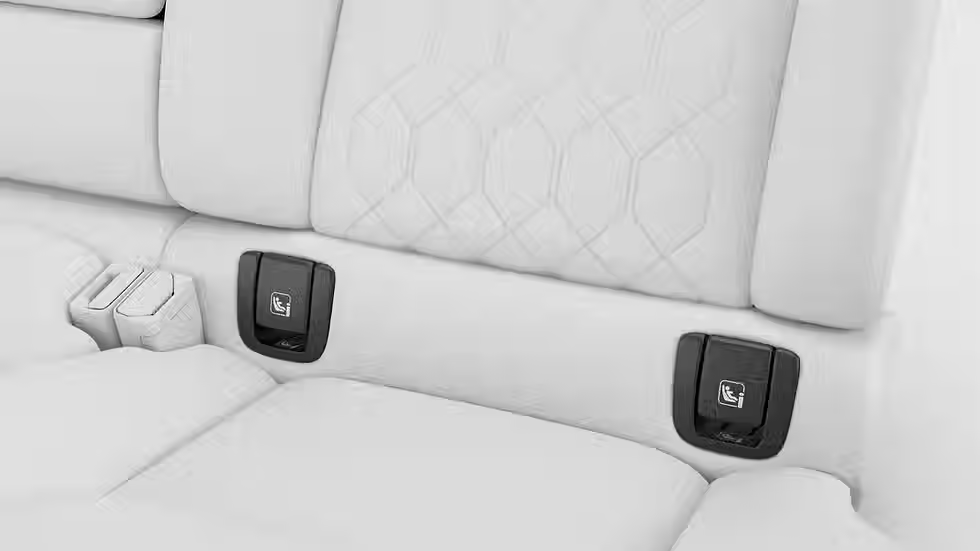
Easy ISOFIX anchorages for child seats Child seats can be installed in any of the three rear seats, with ISOFIX anchorages in the outer positions. Integrated child seats When your little ones outgrow their rear-facing child seats, they can transition to the two built-in booster cushions in the second row. With two height settings, these boosters support a proper seatbelt fit and promote comfortable seating posture. Mechanical or power child lock The standard mechanical child lock on the rear doors can be upgraded to a power child lock. It lets you control the rear doors and windows directly from the driver's seat. Child safety recommendations Our approach to child safety includes rigorous testing based on real-life traffic situations. That's why we strongly recommend keeping kids in rear-facing child seats until they’re at least four years old.
Ride comfort
Reduced cabin noise Quiet is the ultimate luxury in the XC60, where sound insulation and acoustic foam are strategically placed to reduce wind and road noise. Opt for laminated windows to further enhance the calm. Suspension options The standard chassis combines a double wishbone suspension with an integral link in the rear. This design smooths out corners and absorbs bumps, helping you glide through turns. Electronic support systems improve traction and stability, especially with a trailer hitched. Upgrade to an active air suspension for a more harmonic, controlled drive. The system monitors the car, driver and road 500 times per second, adjusting ride height and stiffness in real time.
